
What is a medical history tracker?
A medical history tracker is a tool that keeps your personal health records (lab results, diagnoses, medications, allergies, vaccinations, procedures and doctor's notes) in one place, organized by date. Unlike a folder of PDFs, a good tracker turns those documents into structured data, so you can search them and see how your values change over time.
It's worth separating three things that often get mixed up:
- A patient portal shows what one clinic or hospital recorded about you. When you see a different provider, move or change insurer, that history stays behind.
- An electronic health record (EHR) is the clinic's own system. It's built for the clinic's workflow, not for you.
- A personal health record (PHR) is the record you own and maintain, across every provider. A medical history tracker is a personal health record that does the organizing for you.
People search for this under different names (medical history app, medical records app, medical record tracker, personal health record). The job is the same in each case: one complete, searchable history of your health that belongs to you.
Why your medical history is so hard to keep together
Losing track of your records usually isn't carelessness. It's how healthcare is set up:
Every provider keeps its own copy. Your GP, the private lab you used once, the hospital that did your scan, the dentist and the clinic you went to while traveling all hold separate pieces of your history, and their systems rarely talk to each other.
Lab results arrive as PDFs. The numbers that matter most for long-term health are locked inside documents with different layouts, different names for the same marker, and sometimes different units. Five years of blood tests usually means five years of PDFs nobody has lined up side by side.
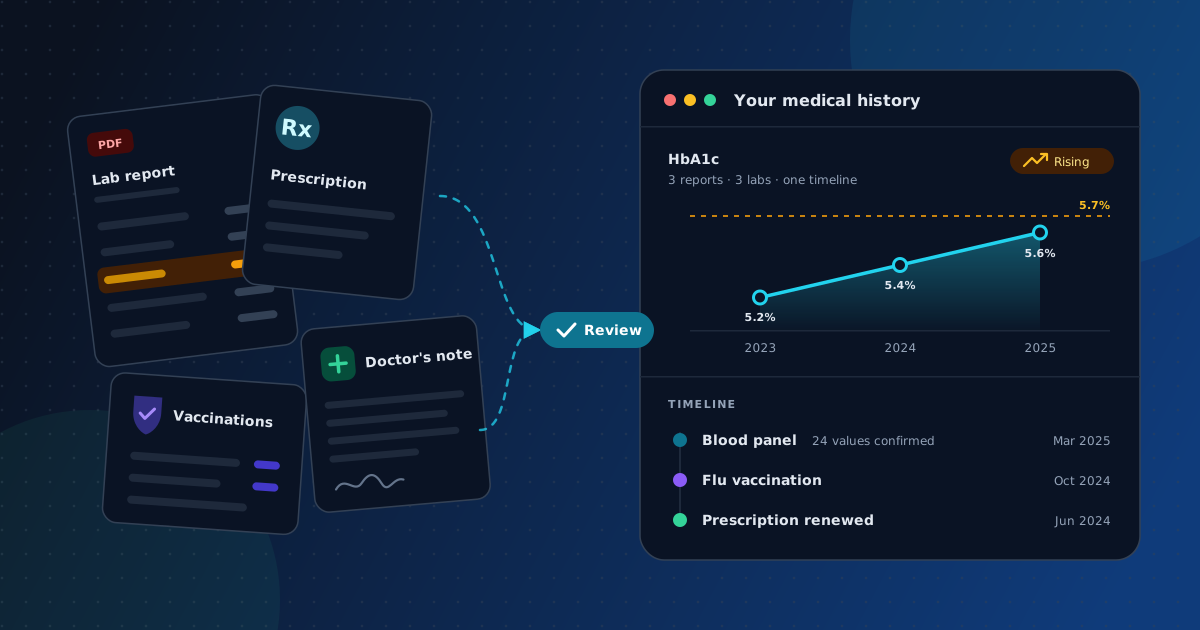
Single results hide trends. Say your HbA1c comes back 5.2%, then 5.4%, then 5.6% across three yearly checkups. Each value is below the 5.7% line the CDC uses for prediabetes, so each report says "normal." A single small change can be ordinary test-to-test variation, especially between different labs. A steady rise across several tests is different, and you only see it when the results sit on one timeline. That isn't a diagnosis. It's a better question to bring to your doctor.
You end up being the one who has to fill the gaps. A new doctor asks when a symptom started, what you took for it last time, and what your last thyroid result was. Without a record, the answer is a guess.
What to track: a complete personal medical history checklist
A useful medical history covers more than blood tests. Use this as your checklist, whether you keep it on paper, in a spreadsheet or in a tracker.
| Category | What to record | Why it matters |
|---|---|---|
| Core profile | Date of birth, blood type (if known), height and weight, emergency contact, primary doctor | The first things any new clinic or emergency team asks for |
| Conditions and diagnoses | Name, date diagnosed, who diagnosed it, current status (active / resolved) | Shows how a condition developed, not just that it exists |
| Medications and supplements | Name, dose, start and stop dates, reason, side effects you noticed | Avoids repeating treatments that didn't work, and lets your doctor or pharmacist check for interactions |
| Allergies and reactions | Substance, type of reaction, severity, date | Critical in emergencies; often missing from portal records |
| Lab results and biomarkers | Full lab reports, plus key values over time (for example HbA1c, ferritin, vitamin D, TSH, LDL, eGFR) | Trends can show change before a single result is flagged |
| Imaging and diagnostic reports | X-ray, ultrasound, MRI, CT and ECG reports with dates | The written report is what the next doctor needs, and it's easy to lose |
| Procedures, surgeries and hospital stays | What, when, where, outcome, follow-up | Affects future treatment, anesthesia and screening decisions |
| Vaccinations | Vaccine, date, dose number or booster | Needed for travel, new jobs, school and catch-up schedules |
| Family health history | Conditions in parents, siblings and grandparents, and the age each was diagnosed | Per the CDC, it helps your doctor decide which screening tests you need and when |
| Lifestyle and context | Smoking, alcohol, activity, pregnancies, blood donations, work exposures | The context that makes lab values interpretable |
| Providers and where records live | Clinics, doctors, labs, portal logins, contact details | Tells you where to request a missing record |
Not sure which blood markers deserve a spot on your timeline? Start with our guide to the important blood biomarkers to track.
5 ways to track your medical history, compared
There's no single correct method, but they don't all hold up equally well over the years. Here's how the common options compare.
| Paper folder | Spreadsheet | Clinic patient portal | Cloud folder of PDFs | Medical history tracker | |
|---|---|---|---|---|---|
| Everything in one place | ✅ if you're disciplined | ⚠️ values only, not documents | ❌ one provider only | ✅ | ✅ |
| Lab values shown as trends | ❌ | ✅ after manual entry | ⚠️ that provider's labs only | ❌ values stay inside PDFs | ✅ automatically |
| Searchable | ❌ | ✅ | ⚠️ | ⚠️ file names only | ✅ |
| Works across different clinics and labs | ✅ | ✅ | ❌ | ✅ | ✅ |
| Effort to keep up | High | High | Low | Medium | Low |
| You control the data | ✅ | ✅ | ❌ provider's system | ✅ | ✅ if you can delete and export |
The short version:
- A paper or cloud folder is a good foundation. Our guide on how to organize medical records covers a folder and file-naming system that stays usable for years.
- A spreadsheet works if you enjoy data entry, and every new report means another round of typing.
- A patient portal is a source, not a system. Download from it, but don't rely on it as your only copy.
- A medical history tracker is the option that keeps working once you have dozens of documents from several providers, because it does the extraction and organizing for you.
How to choose a medical history tracker: 7 things that matter
Plenty of apps call themselves a medical history app. These seven criteria separate the ones you'll still be using in five years from the ones you'll abandon.
- It accepts the records you already have. Most of your history exists as PDFs and scans from many places. A tracker that only syncs with one connected provider leaves most of it out.
- It extracts values, not just files. Storing a PDF is not tracking. The tracker should pull out the actual numbers and names so they can be searched and charted. Here's how extraction from PDF lab reports works, and where it tends to go wrong.
- You review values before anything is saved. AI extraction is fast, but it isn't perfect. Labs use different layouts, and a misread decimal point is a real risk. Values you never checked shouldn't end up on your timeline.
- It lines up results from different labs. The same marker can appear under different names and units depending on the lab. A good tracker turns them into consistent records so you can see them side by side. Labs also use different methods and reference ranges, so treat a small jump between two labs with caution, and ask your doctor before reading much into it. (More on this in how to track lab results over time.)
- It covers more than blood tests. Prescriptions, vaccination records, imaging reports and doctor's notes are part of your medical history too.
- It's open about privacy. You should be able to find out which services process your documents, whether your data is sold, and how deletion works, without reading the terms of service.
- It doesn't pretend to be your doctor. A tracker organizes and clarifies. Diagnosis belongs with a clinician who knows your full picture.
How MedicalHistory.app works as your medical history tracker
Here's how MedicalHistory.app handles those criteria. You don't need to set up a template or type in values by hand. Upload what you already have and confirm it.
1. Upload. Add lab PDFs, medical reports, prescriptions, vaccination records and doctor's notes from different clinics and labs, all in one place.
2. Review. MedicalHistory.app turns unstructured documents into consistent, searchable records. Before anything is saved, you review the extracted values against the original and confirm them.
3. Track. Follow your biomarkers across years on one timeline instead of in separate PDFs. More than 40 markers are grouped by body system (kidney and minerals, liver, heart and lipids, thyroid, blood and vitamins), and each one links to a plain-language explainer in the biomarker library.
See your own timeline in a few minutes.
Upload one lab report and watch it turn into a timeline you can build on.
Privacy, in plain language
- Documents are processed with Google's Gemini API for extraction and stored with Supabase. Access is restricted to your account.
- Your data isn't sold, and it isn't shared beyond the providers needed to run the service.
- You can delete any document whenever you want. Full exports and account deletion are available on request.
- HIPAA covers your doctors, hospitals and insurers. It doesn't cover records you upload to an app yourself, including this one. That's why these answers are spelled out here instead of buried in the terms.
- MedicalHistory.app isn't a healthcare provider and doesn't diagnose or treat. It organizes your records so conversations with your doctor start from the full picture.
All the details are in the FAQ. Comparing options? Read MedicalHistory.app vs. HealthMatters.io.
Start tracking your medical history in one afternoon
You don't need every record on day one. This order gets you the most useful history for the least effort.
Step 1: Collect what's already digital. Download PDFs from every patient portal you have a login for. Then search your email for "lab results", "report" and "PDF" attachments from clinics and labs.
Step 2: Request what's missing. You're entitled to copies of your own records:
- In the US, HIPAA gives you the right to see and get copies of your health information. Providers normally have up to 30 days to respond, can charge only a reasonable fee, and can't deny access because of an unpaid bill (HHS).
- In the EU and EEA, the GDPR's right of access (Article 15) covers data concerning your health, explicitly including medical records with diagnoses and examination results (Recital 63). Organizations generally have one month to respond (GDPR, EUR-Lex).
Step 3: Scan the paper. A phone scanning app is enough. Save one document per PDF, then name and file them using the system in how to organize medical records.
Step 4: Upload your lab reports first. They're where a tracker adds the most value, because a stack of reports becomes trends you can actually read. If you're new to reading them, start with how to read blood test results.
Step 5: Write down what documents don't capture. Current medications and doses, allergies, vaccinations from old booklets, and your family health history. These usually come from memory and a few phone calls to relatives. A one-page summary, saved as a PDF next to your other records, is the document a new doctor actually reads.
Step 6: Keep it current. After every appointment or test, add the new report, which takes a few minutes. Once a month, look at what changed.
What a medical history timeline shows you that a folder can't
Once a few years of records are on one timeline, patterns appear that no single document shows.
Slow drifts inside the normal range. The HbA1c example above is typical. So is LDL creeping up year after year, or vitamin D dropping every winter. A reference range says whether one result is in or out. A timeline shows where you're heading. (Our guide to normal vs. optimal blood test levels explains why "in range" isn't always the full story.)
Effects that build up over time. Regular blood donation is a good example. Canadian Blood Services estimates that up to 35% of whole blood donors become iron-deficient from regular donation, and repeat donors are often iron-deficient despite passing the hemoglobin screen, because that screen detects anemia but not low iron stores (Canadian Blood Services). If your ferritin is tested, a falling line across your own reports can show this before anemia does. That's worth raising with your doctor.
Better appointments. "When did this start?" and "What was your last result?" get exact answers, with the original report right there to open. That's the idea behind a dashboard for your body: you watch the gauges instead of waiting for a warning light.
Frequently asked questions
What is the best way to keep track of my medical history?
Keep one master record that you own, separate from any single clinic's portal. Collect your existing reports as PDFs, request anything missing, and keep everything in a medical history tracker or a well-organized folder. Add each new report after every appointment. The method matters less than having one place and updating it regularly.
What should a personal medical history include?
At minimum: conditions and diagnoses with dates, current and past medications, allergies and reactions, lab results, imaging reports, surgeries and hospital stays, vaccinations, and family health history. The checklist above covers each category and why it matters.
Is there a free medical history tracker?
Yes. MedicalHistory.app is free to start, so you can upload reports and begin building your timeline without paying. A paid Pro plan is also available.
Is a medical records app the same as a medical history tracker?
Mostly, yes. "Medical records app", "medical history app" and "personal health record" describe the same idea: one place for your own health records. The useful difference is between apps that only store documents and trackers that extract and organize the data inside them, so you can see trends over time.
How do I get copies of my medical records?
Ask each provider directly or download them from their patient portal. In the US, HIPAA-covered providers normally have up to 30 days to respond. In the EU and EEA, the GDPR right of access generally means a response within one month. You can't be refused because of an unpaid bill in the US, and fees must be reasonable.
Can I track my family's medical history?
You should track your family health history: which conditions your parents, siblings and grandparents have had, and at what age. Doctors use it to decide which screenings you need and when. MedicalHistory.app accounts are for adults (18+) managing their own records, so each adult family member who wants their own lab timeline should use their own account.
Is it safe to upload my medical records to an app?
It depends on the app, so check before you upload: which services process and store your documents, whether your data is sold, and whether you can delete it. MedicalHistory.app names these openly. Documents are processed with Google's Gemini API and stored with Supabase, your data isn't sold, and you can delete documents at any time. Because you upload the records yourself, HIPAA doesn't apply, which makes clear answers to these questions matter more. See the FAQ for full details.
Does MedicalHistory.app work with lab reports from different labs?
Yes. That's the core problem it was built for. Lab reports differ in layout, marker names and units, so MedicalHistory.app converts them into consistent records, and you review the extracted values before they're saved. Labs also use different methods and reference ranges, so ask your doctor before reading much into a small change between two labs.
Can a medical history tracker replace my doctor's records?
No. Your providers' records stay the official clinical record, and a tracker doesn't diagnose or treat. What a tracker gives you is a complete, portable copy across all your providers, so you and your doctor can start from the full picture.
How often should I update my medical history?
Add new reports as soon as you get them, ideally the same day. Review your timeline once a month, and always before a doctor's appointment. Our guide on how to track lab results includes a simple monthly review routine.
Your medical history, finally in one place
Every report you've ever received, from every clinic, on one timeline you control. Start with the report you got most recently. It takes a few minutes.
Free to start · Review extracted values before anything is saved · Delete documents anytime
Related guides
Sources
- U.S. Department of Health & Human Services: Individuals' Right under HIPAA to Access their Health Information
- European Union: General Data Protection Regulation (EU) 2016/679, Article 15 and Recital 63
- Centers for Disease Control and Prevention: Family Health History and You
- Centers for Disease Control and Prevention: Diabetes Testing
- Canadian Blood Services: The Importance of Iron for Whole Blood Donors